Showing posts with label Google Drive. Show all posts

Wednesday, 29 November 2017

Preserving Google Drive: What about Google Sheets?

There was lots of interest in a blog post earlier this year about preserving Google Docs.

Often the issues we grapple with in the field of digital preservation are not what you'd call 'solved problems' and that is what makes them so interesting. I always like to hear how others are approaching these same challenges so it is great to see so many comments on the blog itself and via Twitter.

This time I'm turning my focus to the related issue of Google Sheets. This is the native spreadsheet application for Google Drive.

Why?

Again, this is an application that is widely used at the University of York in a variety of different contexts, including for academic research data. We need to think about how we might preserve data created in Google Sheets for the longer term.


How hard can it be?

Quite hard actually - see my earlier post!


Exporting from Google Drive

For Google Sheets I followed a similar methodology to Google Docs. Taking a couple of sample spreadsheets and downloading them in the formats that Google provides, then examining these exported versions to assess how well specific features of the spreadsheet were retained.
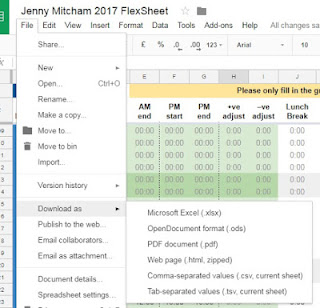
I used the File...Download as... menu in Google Sheets to test out the available export formats

The two spreadsheets I worked with were as follows:

  • A simple spreadsheet which staff had used to select their menu choices for a celebration event. This consisted of just one sheet of data and no particularly advanced features. The sheet did include use of the Google Drive comments facility
  • My flexitime sheet which is provided by my department and used to record the hours I work over the course of the year. It seems to be about as complex as it gets and includes a whole range of features: multiple sheets (that reference each other), controlled data entry through drop down lists, calculations of hours using formula, conditional formatting (ie: specific cells turning red if you have left work too early or taken an inadequate lunch break), code that jumps straight to today's date when you first open it up.

Here is a summary of my findings:

Microsoft Excel - xlsx

I had high hopes for the xlsx export option - however, on opening the exported xlsx version of my flexisheet I was immediately faced with an error message telling me that the file contained unreadable content and asking whether I wanted to recover the contents.

This doesn't look encouraging...

Clicking 'Yes' on this dialogue box then allows the sheet to open and another message appears telling you what has been repaired. In this case it tells me that a formula has been removed.
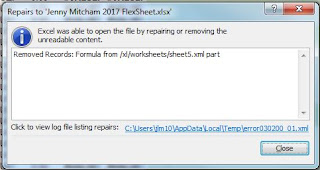

Excel can open the file if it removes the formula

This is not ideal if the formula is considered to be worthy of preservation.

So clearly we already know that this isn't going to be a perfect copy of the Google sheet.

This version of my flexisheet looks pretty messed up. The dates and values look OK, but none of the calculated values are there - they are all replaced with "#VALUE".

The colours on the original flexisheet are important as they flag up problems and issues with the data entered. These however are not fully retained - for example, weekends are largely (but not consistently) marked as red and in the original file they are green (because it is assumed that I am not actually meant to be working weekends).

The XLSX export does however give a better representation of the more simple menu choices Google sheet. The data is accurate, and comments are present in a partial way. Unfortunately though, replies to comments are not displayed and the comments are not associated with a date or time.


Open Document Format - ods

I tried opening the ODS version of the flexisheet in LibreOffice on a Macbook. There were no error messages (which was nice) but the sheet was a bit of a mess. There were similar issues to those that I encountered in the Excel export though it wasn't identical. The colours were certainly applied differently, neither entirely accurate to the original.

If I actually tried to use the sheet to enter more data in, the formula do not work - they do not calculate anything, though it does appear that the formula itself appears to be retained. Any values that are calculated on the original sheet are not present.

Comments are retained (and replies to comments) but no date or time appears to be associated with them (note that the data may be there but just not displaying in LibreOffice).

I also tried opening the ODS file in Microsoft Office. On opening it the same error message was displayed to the one originally encountered in the XLSX version described above and this was followed by notification that “Excel completed file level validation and repair. Some parts of this workbook may have been repaired or discarded.” Unlike the XLSX file there didn't appear to be any additional information available about exactly what had been repaired or discarded - this didn't exactly fill me with confidence!

PDF document - pdf

When downloading a spreadsheet as a PDF you are presented with a few choices - for example:
  • Should the export include all sheets, just the current sheet or current selection (note that current sheet is the default response)
  • Should the export include the document title?
  • Should the export include sheet names?
To make the export as thorough as possible I chose to export all sheets and include document title and sheet names.

As you might expect this was a good representation of the values on the spreadsheet - a digital print if you like - but all functionality and interactivity was lost. In order to re-use the data, it would need to be copied and pasted or re-typed back into a spreadsheet application.

Note that comments within the sheet were not retained and also there was no option to export sheets that were hidden.

Web page - html

This gave an accurate representation of the values on the spreadsheet, but, similar to the PDF version, not in a way that really encourages reuse. Formula were not retained and the resulting copy is just a static snapshot.

Interestingly, the comments in the menu choices example weren't retained. This surprised me because when using the html export option for Google documents one of the noted benefits was that comments were retained. Seems to be a lack of consistency here.

Another thing that surprised me about this version of the flexisheet was that it included hidden sheets (I hadn't until this point realised that there were hidden sheets!). I later discovered that the XLSX and ODS also retained the hidden sheets ...but they were (of course) hidden so I didn't immediately notice them! 

Tab delimited and comma separated values - tsv and csv

It is made clear on export that only the current sheet is exported so if using this as an export strategy you would need to ensure you exported each individual sheet one by one.

The tab delimited export of the flexisheet surprised me. In order to look at the data properly I tried importing it into MS Excel. It came up with a circular reference warning which surprised me - were some of the dynamic properties of the sheets being somehow retained (all be it in a way that was broken)?

tab_delim_error_when_import_to_Excel.png
A circular reference warning when opening the tab delimited file in Microsoft Excel

Both of these formats did a reasonable job of capturing the simple menu choices data (though note that the comments were not retained) but neither did an acceptable job of representing the complex data within the flexisheet (given that the more complex elements such as formulas and colours were not retained).

What about the metadata?

I won't go into detail again about the other features of a Google Sheet that won't be saved with these export options - for example information about who created it and when and the complete revision history that is available through Google Drive - this is covered in a previous post. Given my findings when I interviewed a researcher here at the University of York about their use of Google Sheets, the inability of the export options to capture the version history will be seen as problematic for some use cases.

What is the best export format for Google Sheets?

The short answer is 'it depends'.

The export options available all have pros and cons and as ever, the most suitable one will very much depend on the nature of the original file and the properties that you consider to be most worthy of preservation.


  • If for example the inclusion of comments is an essential requirement, XLSX or ODS will be the only formats that retain them (with varying degrees of success). 
  • If you just want a static snapshot of the data in its final form, PDF will do a good job (you must specify that all sheets are saved), but note that if you want to include hidden sheets, HTML may be a better option. 
  • If the data is required in a usable form (including a record of the formula used) you will need to try XLSX or ODS but note that calculated values present in the original sheet may be missing. Similar but not identical results were noted with XLSX and ODS so it would be worth trying them both and seeing if either is suitable for the data in question.


It should be possible to export an acceptable version of the data for a simple Google Sheet but for a complex dataset it will be difficult to find an export option that adequately retains all features.

Exporting Google Sheets seems even more problematic and variable than Google Documents and for a sheet as complex as my flexisheet it appears that there is no suitable option that retains the functionality of the sheet as well as the content.

So, here's hoping that native Google Drive files appear on the list of World's Endangered Digital Species...due to be released on International Digital Preservation Day! We will have to wait until tomorrow to find out...


A disclaimer: I carried out the best part of this work about 6 months ago but have only just got around to publishing it. Since I originally carried out the exports and noted my findings, things may have changed!


Jenny Mitcham, Digital Archivist

Friday, 7 July 2017

Preserving Google docs - decisions and a way forward

Back in April I blogged about some work I had been doing around finding a suitable export (and ultimately preservation) format for Google documents.

This post has generated a lot of interest and I've had some great comments both on the post itself and via Twitter.

I was also able to take advantage of a slot I had been given at last week's Jisc Research Data Network event to introduce the issue to the audience (who had really come to hear me talk about something else but I don't think they minded).

There were lots of questions and discussion at the end of this session, mostly focused on the Google Drive issue rather than the rest of the talk. I was really pleased to see that the topic had made people think. In a lightening talk later that day, William Kilbride, Executive Director of The Digital Preservation Coalition mused on the subject of "What is data?". Google Drive was one of the examples he used, asking where does the data end and the software application start?

I just wanted to write a quick update on a couple of things - decisions that have been made as a result of this work and attempts to move the issue forward.

Decisions decisions

I took a summary of the Google docs data export work to my colleagues in a Research Data Management meeting last month in order to discuss a practical way forward for the institutional research data we are planning on capturing and preserving.

One element of the Proof of Concept that we had established at the end of phase 3 of Filling the Digital Preservation Gap was a deposit form to allow researchers to deposit data to the Research Data York service.

As well as the ability to enable researchers to browse and select a file or a folder on their computer or network, this deposit form also included a button to allow deposit to be carried out via Google Drive.

As I mentioned in a previous post, Google Drive is widely used at our institution. It is clear that many researchers are using Google Drive to collect, create and analyse their research data so it made sense to provide an easy way for them to deposit direct from Google Drive. I just needed to check out the export options and decide which one we should support as part of this automated export.

However, given the inconclusive findings of my research into export options it didn't seem that there was one clear option that adequately preserved the data.

As a group we decided the best way out of this imperfect situation was to ask researchers to export their own data from Google Drive in whatever format they consider best captures the significant properties of the item. By exporting themselves in a manual fashion prior to upload, this does give them the opportunity to review and check their files and make their own decision on issues such as whether comments are included in the version of their data that they upload to Research Data York.

So for the time being we are disabling the Google Drive upload button from our data deposit interface....which is a shame because a certain amount of effort went into getting that working in the first place.

This is the right decision for the time being though. Two things need to happen before we can make this available again:


  1. Understanding the use case - We need to gain a greater understanding of how researchers use Google Drive and what they consider to be 'significant' about their native Google Drive files.
  2. Improving the technology - We need to make some requests to Google to make the export options better.


Understanding the use case

We've known for a while that some researchers use Google Drive to store their research data. The graphic below was taken from a survey we carried out with researchers in 2013 to find out about current practice across the institution. 

Of the 188 researchers who answered the question "Where is your digital research data stored (excluding back up copies)?" 22 mentioned Google Drive. This is only around 12% of respondents but I would speculate that over the last four years, use of Google Drive will have increased considerably as Google applications have become more embedded within the working practices of staff and students at the University.

Where is your digital research data stored (excluding back up copies)?

To understand the Google Drive use case today I really need to talk to researchers.

We've run a couple of Research Data Management teaching sessions over the last term. These sessions are typically attended by PhD students but occasionally a member of research staff also comes along. When we talk about data storage I've been asking the researchers to give a show of hands as to who is using Google Drive to store at least some of their research data.

About half of the researchers in the room raise their hand.

So this is a real issue. 

Of course what I'd like to do is find out exactly how they are using it. Whether they are creating native Google Drive files or just using Google Drive as a storage location or filing system for data that they create in another application.

I did manage to get a bit more detail from one researcher who said that they used Google Drive as a way of collaborating on their research with colleagues working at another institution but that once a document has been completed they will export the data out of Google Drive for storage elsewhere. 

This fits well with the solution described above.

I also arranged a meeting with a Researcher in our BioArCh department. Professor Matthew Collins is known to be an enthusiastic user of Google Drive.

Talking to Matthew gave me a really interesting perspective on Google Drive. For him it has become an essential research tool. He and his colleagues use many of the features of the Google Suite of tools for their day to day work and as a means to collaborate and share ideas and resources, both internally and with researchers in other institutions. He showed me PaperPile, an extension to Google Drive that I had not been aware of. He uses this to manage his references and share them with colleagues. This clearly adds huge value to the Google Drive suite for researchers.

He talked me through a few scenarios of how they use Google - some, (such as the comments facility) I was very much aware of. Others, I've not used myself such as the use of the Google APIs to visualise for example activity on preparing a report in Google Drive - showing a time line and when different individuals edited the document. Now that looks like fun!

He also talked about the importance of the 'previous versions' information that is stored within a native Google Drive file. When working collaboratively it can be useful to be able to track back and see who edited what and when. 

He described a real scenario in which he had had to go back to a previous version of a Google Sheet to show exactly when a particular piece of data had been entered. I hadn't considered that the previous versions feature could be used to demonstrate that you made a particular discovery first. Potentially quite important in the competitive world of academic research.

For this reason Matthew considered the native Google Drive file itself to be "the ultimate archive" and "a virtual collaborative lab notebook". A flat, static export of the data would not be an adequate replacement.

He did however acknowledge that the data can only exist for as long as Google provides us with the facility and that there are situations where it is a good idea to take a static back up copy.

He mentioned that the precursor to Google Docs was a product called Writely (which he was also an early adopter of). Google bought Writely in 2006 after seeing the huge potential in this online word processing tool. Matthew commented that backwards compatibility became a problem when Google started making some fundamental changes to the way the application worked. This is perhaps the issue that is being described in this blog post: Google Docs and Backwards Compatibility.

So, I'm still convinced that even if we can't preserve a native Google Drive file perfectly in a static form, this shouldn't stop us having a go!

Improving the technology

Along side trying to understand how researchers use Google Drive and what they consider to be significant and worthy of preservation, I have also been making some requests and suggestions to Google around their export options. There are a few ideas I've noted that would make it easier for us to archive the data.

I contacted the Google Drive forum and was told that as a Google customer I was able to log in and add my suggestions to Google Cloud Connect so this I did...and what I asked for was as follows:

  • Please can we have a PDF/A export option?
  • Please could we choose whether or not to export comments or not ...and if we are exporting comments can we choose whether historic/resolved comments are also exported
  • Please can metadata be retained - specifically the created and last modified dates. (Author is a bit trickier - in Google Drive a document has an owner rather than an author. The owner probably is the author (or one of them) but not necessarily if ownership has been transferred).
  • I also mentioned a little bug relating to comment dates that I found when exporting a Google document containing comments out into docx format and then importing it back again.
Since I submitted these feature requests and comments in early May it has all gone very very quiet...

I have a feeling that ideas only get anywhere if they are popular ...and none of my ideas are popular ...because they do not lead to new and shiny functionality.

Only one of my suggestions (re comments) has received a vote by another member of the community.

So, what to do?

Luckily, since having spoken about my problem at the Jisc Research Data Network, two people have mentioned they have Google contacts who might be interested in hearing my ideas.

I'd like to follow up on this, but in the meantime it would be great if people could feedback to me. 

  • Are my suggestions sensible? 
  • Are there are any other features that would help the digital preservation community preserve Google Drive? I can't imagine I've captured everything...


Jenny Mitcham, Digital Archivist

Friday, 28 April 2017

How can we preserve Google Documents?

Last month I asked (and tried to answer) the question How can we preserve our wiki pages?

This month I am investigating the slightly more challenging issue of how to preserve native Google Drive files, specifically documents*.

Why?

At the University of York we work a lot with Google Drive. We have the G Suite for Education (formally known as Google Apps for Education) and as part of this we have embraced Google Drive and it is now widely used across the University. For many (me included) it has become the tool of choice for creating documents, spreadsheets and presentations. The ability to share documents and directly collaborate are key.

So of course it is inevitable that at some point we will need to think about how to preserve them.

How hard can it be?

Quite hard actually.

The basic problem is that documents created in Google Drive are not really "files" at all.

The majority of the techniques and models that we use in digital preservation are based around the fact that you have a digital object that you can see in your file system, copy from place to place and package up into an Archival Information Package (AIP).

In the digital preservation community we're all pretty comfortable with that way of working.

The key challenge with stuff created in Google Drive is that it doesn't really exist as a file.

Always living in hope that someone has already solved the problem, I asked the question on Twitter and that really helped with my research.

Isn't the digital preservation community great?

Exporting Documents from Google Drive

I started off testing the different download options available within Google docs. For my tests I used 2 native Google documents. One was the working version of our Phase 1 Filling the Digital Preservation Gap report. This report was originally authored as a Google doc, was 56 pages long and consisted of text, tables, images, footnotes, links, formatted text, page numbers, colours etc (ie: lots of significant properties I could assess). I also used another more simple document for testing - this one was just basic text and tables but also included comments by several contributors.

I exported both of these documents into all of the different export formats that Google supports and assessed the results, looking at each characteristic of the document in turn and establishing whether or not I felt it was adequately retained.

Here is a summary of my findings, looking specifically at the Filling the Digital Preservation Gap phase 1 report document:

  • docx - This was a pretty good copy of the original. It retained all of the key features of the report that I was looking for (images, tables, footnotes, links, colours, formatting etc), however, the 56 page report was now only 55 pages (in the original, page 48 was blank, but in the docx version this blank page wasn't there).
  • odt - Again, this was a good copy of the originals and much like the docx version in terms of the features it retained. However, the 56 page report was now only 54 pages long. Again it omitted page 48 which was blank in the Google version, but also slightly more words were squeezed on to each page which meant that it comprised of fewer pages. Initially I thought the quality of the images was degraded slightly but this turned out to be just the way they appeared to render in LibreOffice. Looking inside the actual odt file structure and viewing the images as files demonstrated to me that they were actually OK. 
  • rtf - First of all it is worth saying that the Rich Text Format file was *massive*. The key features of the document were retained, although the report document was now 60 pages long instead of 56!
  • txt - Not surprisingly this produces a tiny file that retains only the text of the original document. Obviously the original images, tables, colours, formatting etc were all lost. About the only other notable feature that was retained were the footnotes and these appeared together right at the end of the document. Also a txt file does not have a number of 'pages'... not until you print it at least.
  • pdf - This was a good copy of the original report and retained all the formatting and features that I was looking for. This was also the only copy of the report that had the right number of pages. However, it seems that this is not something we can rely on. A close comparison of the pages of the pdf compared with the original shows that there are some differences regarding which words fall on to which page - it isn't exact!
  • epub - Many features of the report were retained but like the text file it was not paginated and the footnotes were all at the end of the document. The formatting was partially retained - the images were there, but were not always placed in the same positions as in the original. For example on the title page, the logos were not aligned correctly. Similarly, the title on the front page was not central.
  • html - This was very similar to the epub file regarding what was and wasn't retained. It included footnotes at the end and had the same issues with inconsistent formatting.

...but what about the comments?

My second test document was chosen so I could look specifically at the comments feature and how these were retained (or not) in the exported version.

  • docx - Comments are exported. On first inspection they appear to be anonymised, however this seems to be just how they are rendered in Microsoft Word. Having unzipped and dug into the actual docx file and looked at the XML file that holds the comments, it is clear that a more detailed level of information is retained - see images below. The placement of the comments is not always accurate. In one instance the reply to a comment is assigned to text within a subsequent row of the table rather than to the same row as the original comment.
  • odt -  Comments are included, are attributed to individuals and have a date and time. Again, matching up of comments with right section of text is not always accurate - in one instance a comment and it's reply are linked to the table cell underneath the one that they referenced in the original document.
  • rtf - Comments are included but appear to be anonymised when displayed in MS Word...I haven't dug around enough to establish whether or not this is just a rendering issue.
  • txt - Comments are retained but appear at the end of the document with a [a], [b] etc prefix - these letters appear in the main body text to show where the comments appeared. No information about who made the comment is preserved.
  • pdf - Comments not exported
  • epub - Comments not exported
  • html - Comments are present but appear at the end of the document with a code which also acts as a placeholder in the text where the comment appeared. References to the comments in the text are hyperlinks which take you to the right comment at the bottom of the document. There is no indication of who made the comment (not even hidden within the html tags).

A comment in original Google doc

The same comment in docx as rendered by MS Word

...but in the XML buried deep within the docx file structure - we do have attribution and date/time
(though clearly in a different time zone)

What about bulk export options?

Ed Pinsent pointed me to the Google Takeout Service which allows you to:
"Create an archive with your data from Google products"
[Google's words not mine - and perhaps this is a good time to point you to Ed's blog post on the meaning of the term 'Archive']

This is really useful. It allows you to download Google Drive files in bulk and to select which formats you want to export them as.

I tested this a couple of times and was surprised to discover that if you select pdf or docx (and perhaps other formats that I didn't test) as your export format of choice, the takeout service creates the file in the format requested and an html file which includes all comments within the document (even those that have been resolved). The content of the comments/responses including dates and times is all included within the html file, as are names of individuals.

The downside of the Google Takeout Service is that it only allows you to select folders and not individual files. There is another incentive for us to organise our files better! The other issue is that it will only export documents that you are the owner of - and you may not own everything that you want to archive!

What's missing?

Quite a lot actually.

The owner, creation and last modified dates of a document in Google Drive are visible when you click on Document details... within the File menu. Obviously this is really useful information for the archive but is lost as soon as you download it into one of the available export formats.

Creation and last modified dates as visible in Document details

Update: I was pleased to see that if using the Google Takeout Service to bulk export files from Drive, the last modified dates are retained, however on single file export/download these dates are lost and the last modified date of the file becomes the date that you carried out the export. 

Part of the revision history of my Google doc
But of course in a Google document there is more metadata. Similar to the 'Page History' that I mentioned when talking about preserving wiki pages, a Google document has a 'Revision history'

Again, this *could* be useful to the archive. Perhaps not so much so for my document which I worked on by myself in March, but I could see more of a use case for mapping and recording the creative process of writing a novel for example. 

Having this revision history would also allow you to do some pretty cool stuff such as that described in this blog post: How I reverse engineered Google Docs to play back any documents Keystrokes (thanks to Nick Krabbenhoft for the link).

It would seem that the only obvious way to retain this information would be to keep the documents in their original native Google format within Google Drive but how much confidence do we have that it will be safe there for the long term?

Conclusions

If you want to preserve a Google Drive document there are several options but no one-size-fits-all solution.

As always it boils down to what the significant properties of the document are. What is it we are actually trying to preserve?

  • If we want a fairly accurate but non interactive digital 'print' of the document, pdf might be the most accurate representation though even the pdf export can't be relied on to retain the exact pagination. Note that I didn't try and validate the pdf files that I exported and sadly there is no pdf/a export option.
  • If comments are seen to be a key feature of the document then docx or odt will be a good option but again this is not perfect. With the test document I used, comments were not always linked to the correct point within the document.
  • If it is possible to get the owner of the files to export them, the Google Takeout Service could be used. Perhaps creating a pdf version of the static document along with a separate html file to capture the comments.

A key point to note is that all export options are imperfect so it would be important to check the exported document against the original to ensure it accurately retains the important features.

Another option would be simply keeping them in their native format but trying to get some level of control over them - taking ownership and managing sharing and edit permissions so that they can't be changed. I've been speaking to one of our Google Drive experts in IT about the logistics of this. A Google Team Drive belonging to the Archives could be used to temporarily store and lock down Google documents of archival value whilst we wait and see what happens next. 

...I live in hope that export options will improve in the future.

This is a work in progress and I'd love to find out what others think.


* note, I've also been looking at Google Sheets and that may be the subject of another blog post


Jenny Mitcham, Digital Archivist

The sustainability of a digital preservation blog...

So this is a topic pretty close to home for me. Oh the irony of spending much of the last couple of months fretting about the future prese...